
1 基础知识
1.1 软件简介
– KeycloakIP地址验证器,英文全称keycloak-ipaddress-authenticator
– KeycloakIP地址验证器,支持根据客户端IP地址实现条件身份验证流程
– KeycloakIP地址验证器,支持IPv6和IPv4,支持CIDR格式单个IP地址或范围以及子网掩码表示范围
1.2 场景范例
– 只对公司网络外部连接的用户显示OTP表单,内部不显示OTP表单
2 最佳实践
2.1 配置环境
2.2 在Keycloak安装KeycloakIP地址验证器
2.2.1 下载软件包
cd ~
wget https://github.com/evosec/keycloak-ipaddress-authenticator/releases/download/26.0.2_0/keycloak-ipaddress-authenticator-26.0.2_0-jar-with-dependencies.jar
以上只是下载演示,如果下载异常或需要更新的版本,请从如下连接下载,
https://github.com/evosec/keycloak-ipaddress-authenticator/releases
2.2.2 部署软件包
cd ~
cp keycloak-ipaddress-authenticator-26.0.2_0-jar-with-dependencies.jar ${RHBK_HOME}/providers/keycloak-ipaddress-authenticator.jar
chown keycloak:keycloak ${RHBK_HOME}/providers/keycloak-ipaddress-authenticator.jar
2.2.3 停止Keycloak服务
systemctl stop keycloak
2.2.4 重新构建Keycloak
sudo -u keycloak bash -c "${RHBK_HOME}/bin/kc.sh build --db=mariadb"
正常可见如下提示,
INFO: The following run time options were found, but will be ignored during build time: kc.log, kc.log-file, kc.log-level, kc.db-url, kc.db-username, kc.db-password, kc.proxy-headers, kc.https-certificate-file, kc.https-certificate-key-file, kc.hostname, kc.hostname-admin, kc.cache, kc.cache-stack

Updating the configuration and installing your custom providers, if any. Please wait.
2025-11-24 11:38:28,265 WARN  [org.keycloak.services] (build-32) KC-SERVICES0047: privacyidea-authenticator (org.privacyidea.authenticator.PrivacyIDEAAuthenticatorFactory) is implementing the internal SPI authenticator. This SPI is internal and may change without notice
2025-11-24 11:38:33,786 INFO  [io.quarkus.deployment.QuarkusAugmentor] (main) Quarkus augmentation completed in 8845ms
Server configuration updated and persisted. Run the following command to review the configuration:

        kc.sh show-config
根据提示执行如下命令,
sudo -u keycloak bash -c "${RHBK_HOME}/bin/kc.sh show-config" | grep -i ip
可见如下提示,
kc.provider.file.keycloak-ipaddress-authenticator.jar.last-modified = 1763345775462 (Persisted)
2.2.5 重启服务使部署生效
systemctl start keycloak
2.2.6 界面验证插件安装
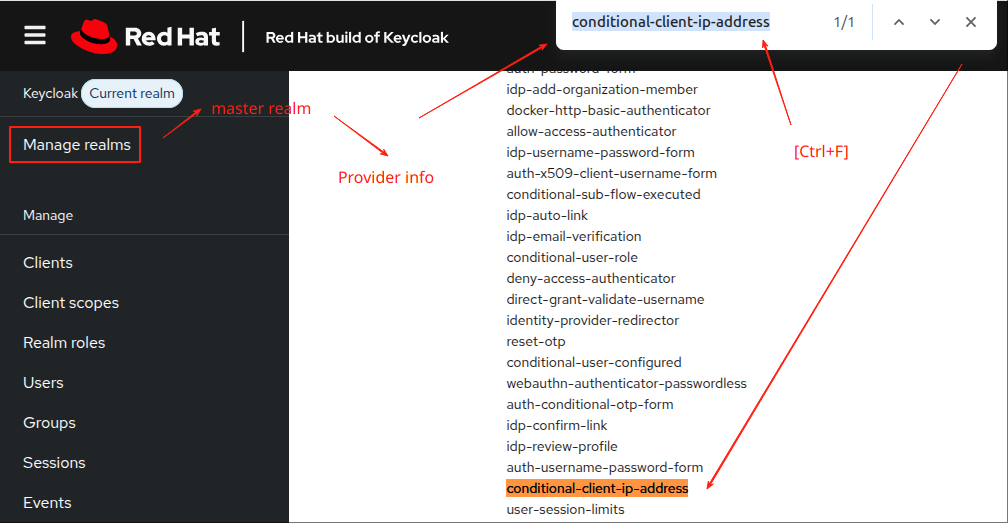
如上图所示,
单击【Manage realms】->选择非【master】的域
单击【Manage realms】->选择【master】->【Provider info】
如果看到“authenticator”中包含“conditional-client-ip-address”即表示KeycloakIP地址验证器插件被正确加载
2.2 在Keycloak配置KeycloakIP地址验证器
2.2.1 添加流程的前提条件
以下截图的具体菜单为【Manage realms】->【Realms XXX】->【Authentication】
具体地,我建议你先熟悉如下章节,
以上章节提供非条件的privacyIDEA认证,类似下图,
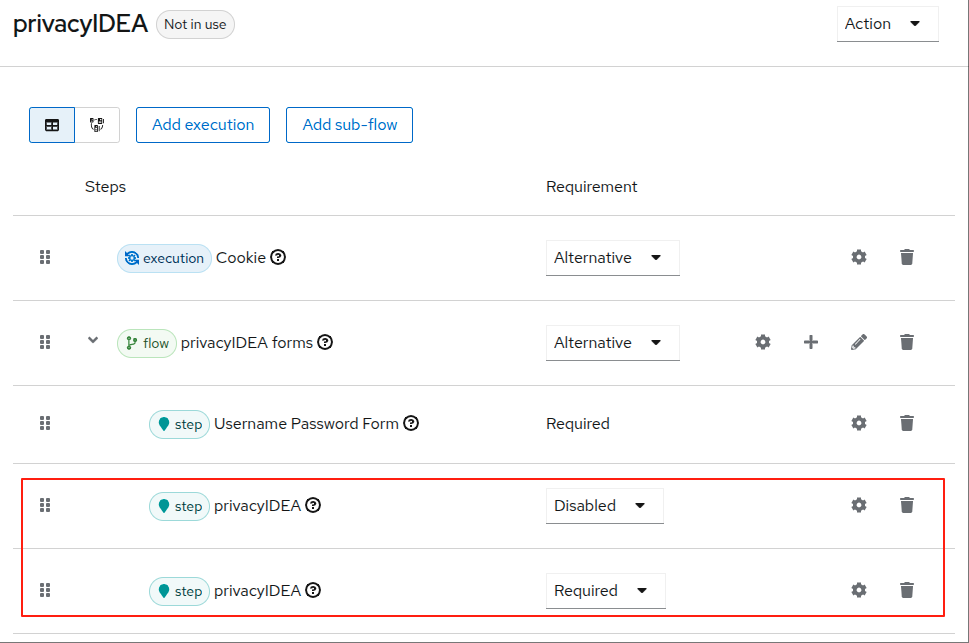
因此,如果需要添加条件认证,以上圈红部分的OTP执行流程(step privacyIDEA)你需要先删除。
2.2.2 添加流程
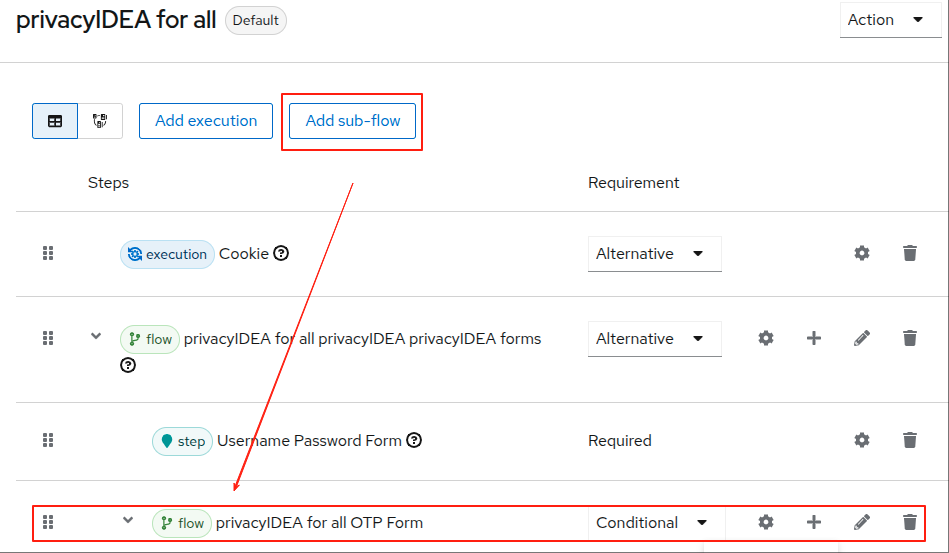
如上图所示,
单击【Add sub-flow】,在弹出的创建,
– 参数“Name”填写“privacyIDEA for all OTP Form config”
– 参数“Flow type”选择“Generic”
单击【Add】即可创建“flow”
2.2.3 添加流程的条件
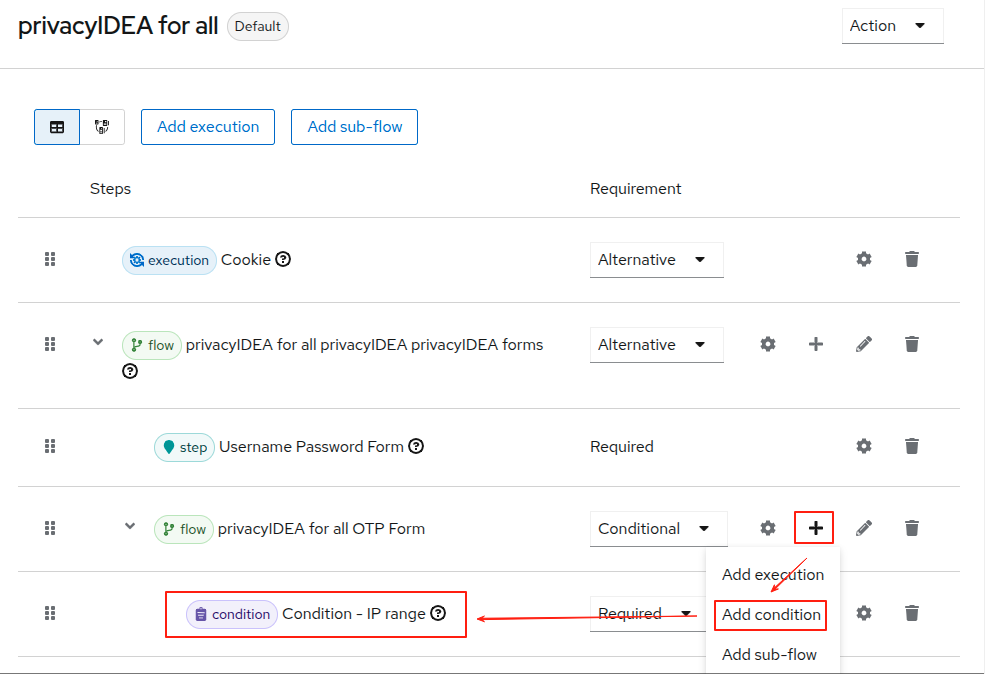
如上图所示,
单击“Flow type”(即privacyIDEA for all OTP Form)行的“+”号
弹出的菜单中选择“Add condition”,窗口显示如下,
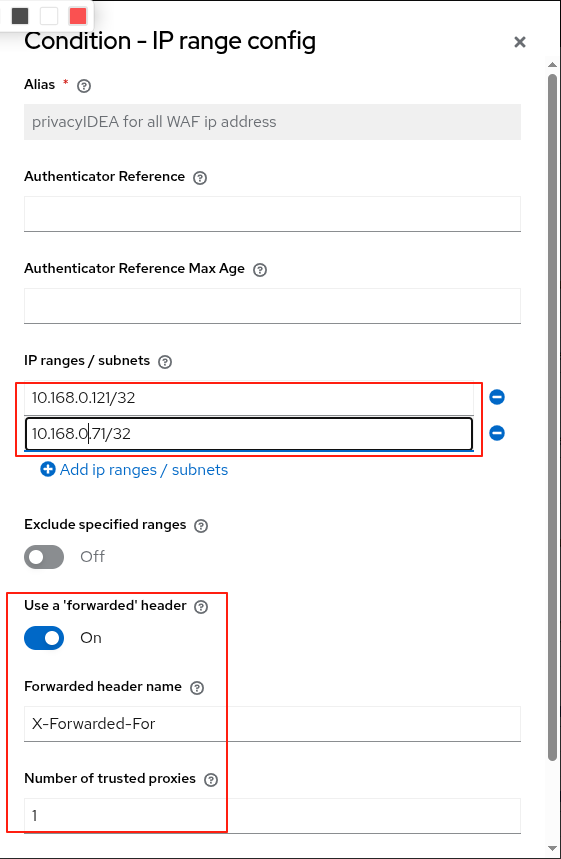
如上图所示,
– 参数“Alias”填写“privacyIDEA for all WAF ip address”
– 参数“IP range/subnet”分别填写“10.168.0.121/32”和“10.168.0.71/32”,即代理地址,表示只有代理的请求才会启动OTP
– 参数“Use a ‘forwarded’ header选择“True”
– 参数“Forwarded header name”填写“X-Forwarded-For”
– 参数“”“Number of trusted proxies”填写“1”,我环境有两层代理,一层为透明代理,因此填“1”。
2.2.4 添加流程的执行
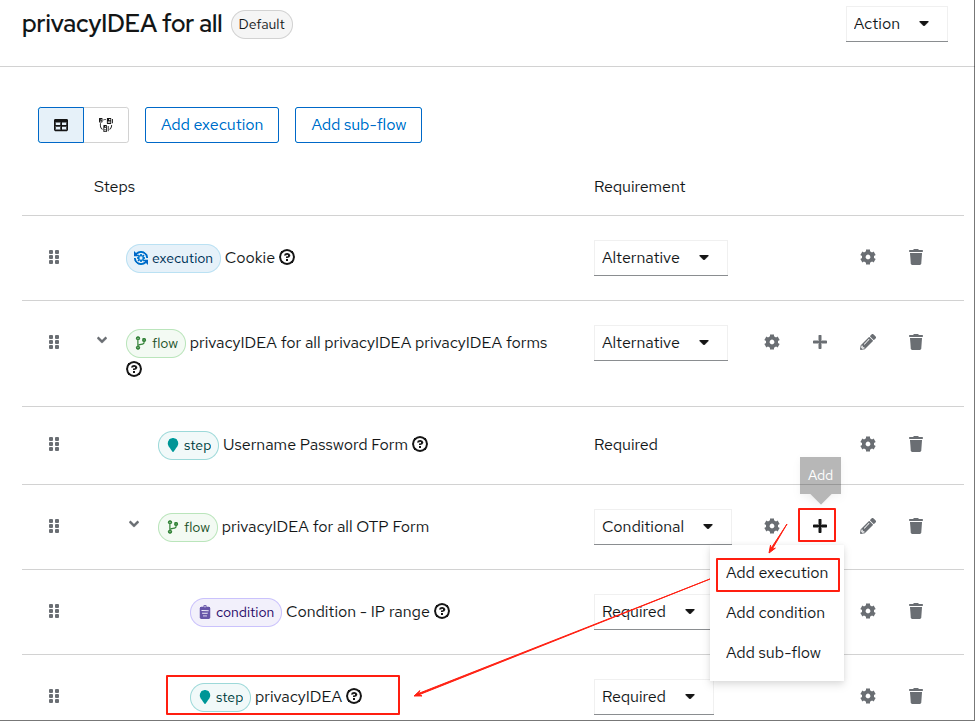
如上图所示,
单击“Flow type”(即privacyIDEA for all OTP Form)行的“+”号
弹出的菜单中选择“Add execution”,具体的界面配置我这里不再详述,与如下章节大同小异,
2.3 测试
2.3.1 使用浏览器登陆测试
https://websso.cmdschool.org/realms/cmdschool/account
2.3.2 故障排除
tail -f /var/log/keycloak/keycloak.log
参阅文档
===================
官方首页
—————–
https://github.com/evosec/keycloak-ipaddress-authenticator
软件下载地址
—————-
https://github.com/evosec/keycloak-ipaddress-authenticator/releases

没有评论